
Troubleshooting
Issue | Issue Description | Root Cause | Solution |
Scale |
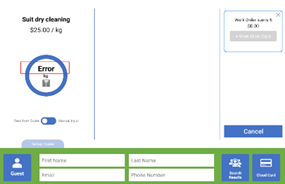
| The scale is disconnected | Close the current page and enter this page again |
The scale is turned off | Turn on the scale | ||
The scale is disabled in "Settings" | Go to the main menu of the cash register -> employee image -> settings to enable the scale. | ||
The cable connection is loose | Check cables then reinsert the cables | ||
The Bluetooth of the scale is off | Check the status of the scale connection on the Initialization page. See manual section 11.1 | ||
The reading weight is incorrect | In Tare mode | Press Zero button | |
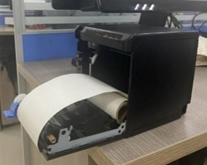
Printer | The printed receipt is empty | The paper roll was not placed correctly. | Install the paper roll as is shown below
|
VXT | The VXT disconnected. | The connection cable is loose. | Tap the button at the bottom right corner of the page to reconnect the VXT.
If the connection still fails, reconnect the VXT cables. |
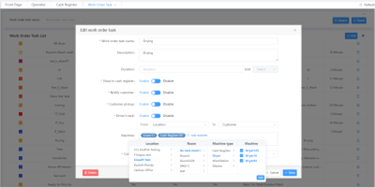
Cash Register | Work Order doesn’t progress on Cash Register Work Order board. | The settings in Backoffice are incorrect. | Go to Backoffice->Work Order-> Work Order Task List->Edit->Machine->Add Machine . Check the Location info, Room info and Machine type. Make sure all the machines included in the work order are added .
|
The cash transaction is not supported. | The employee didn't perform "Opening Cash". | Perform "Opening Cash". | |
The location information is updated in Backoffice, but not updated in Cash Register. | The cash register was not restarted. | Enter the initialization page | |
Device is not responding | Cable disconnected | Check cable connection | |
Screen is black | Cable disconnected | Check power | |
Failed to register/top off but other functions work well | The SRC and injected Key don’t belong to the same vendor. | Reinject Key with the correct Key card | |
Sync Server Failed on Initialization Screen | Time zone not set | Check Time zone for location | |
Network Time out | POS not connecting to internet | Check WiFi/Ethernet connection | |
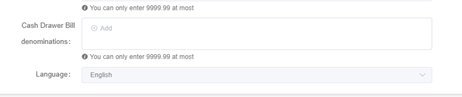
Cash denominations not showing on closing cash | Denominations not set in Backoffice | Set the amounts in back office under location.
| |
Employee name not showing in Sign In | User list was not synced | Restart app | |
Opening Cash or other register option/s not available | Register group not created | Create cash register group in Backoffice |

FAQ
Question Description | Solution |
|---|---|